Based on our overall comparison score, Dell S2721DGF rates higher at 56/100 versus 47/100 for Dell S3225QS — a 9-point lead. Dell S2721DGF is the stronger overall pick, though the right choice still depends on which specs matter most to you; the full spec table above breaks down every difference.
Dell S2721DGF vs Dell S3225QS
Updated Nov 2026 · Scored by the Let’s Compare Data Engine · How we score
For most buyers the Dell S2721DGF is the better pick — it scores 63/100 to the Dell S3225QS's 48, leading on Image Quality and Performance. Choose the Dell S3225QS instead if panel matters most to you, where it comes out ahead.
Verdict
Our overall take, at a glance
Key takeaways
- Dell S2721DGF leads Dell S3225QS overall by 15 points (63 vs 48 out of 100).
- Dell S2721DGF stands out on Performance Response Time (GtG): 1 ms (75% less), Performance Refresh Rate: 165 Hz (38% more), Image Quality Brightness (typical): 400 nits (33% more).
Dell S2721DGF leads overall
Dell S2721DGF
63
Dell S3225QS
48
Why it stands out
- Performance Response Time (GtG): 1 ms (75% less)
- Performance Refresh Rate: 165 Hz (38% more)
- Image Quality Brightness (typical): 400 nits (33% more)
Watch-outs
Compromises to know before you buy
Dell S2721DGF
- No USB-C — no single-cable laptop connection.
Dell S3225QS
- No USB-C — no single-cable laptop connection.
In-depth analysisAI
AI-generated from the cited sources — may be incomplete or inaccurate; verify important details before deciding · generated Nov 2026.
Dell S2721DGF
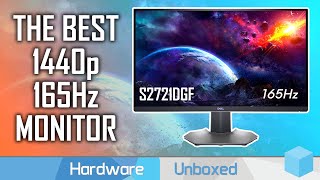
The Dell S2721DGF is a 27-inch display featuring a 1440p resolution and a maximum refresh rate of 165Hz. Aimed primarily at PC gamers, it prioritizes fast motion performance and versatile physical adjustability over extra productivity features.
Best for Fast-paced competitive gaming requiring quick response timesBest for Desk setups that demand high physical screen adjustability
Pros
- Fast response times delivering clear motion handling
- Highly flexible stand with strong ergonomic adjustability
- Smooth performance driven by a 165Hz refresh rate at 1440p
Cons
- Lacks USB-C connectivity with DisplayPort Alt Mode
- Does not offer advanced features like a built-in KVM switch or Picture-in-Picture mode
Dell S3225QS
The Dell S3225QS is a 31.5-inch 4K monitor built with a VA panel offering a 3840 x 2160 resolution and a 120Hz refresh rate. It is designed for general productivity and multimedia viewing, incorporating basic gaming features such as FreeSync Premium and HDMI VRR support. The display features a 3000:1 contrast ratio, built-in speakers, and an adjustable stand with height modifications.
Best for multitasking with multiple windows on a large 4K screenBest for casual console and PC gaming at 120Hz
Pros
- Sharp 4K resolution on a spacious 31.5-inch display
- High 3000:1 contrast ratio inherent to the VA panel
- 120Hz refresh rate with FreeSync Premium and HDMI VRR support
- Includes height adjustment and built-in speakers
Cons
- Lacks a USB-C connection and integrated USB hub functionality
- Moderate peak brightness of 300 nits limits robust HDR performance
Value for Money
Which is the better deal for the price
Pre-filled with launch prices where known — enter today's price for an up-to-date check. Use the same currency for both.
Dell S2721DGF
Dell S3225QS
Physical Comparison
Weight, side by side
Dell S2721DGFDell S3225QS
Dell S3225QS is 1.47 kg (33%) heavier than Dell S2721DGF.
Detailed Specifications
The full spec sheet, side by side
Frequently Asked Questions
Common questions about Dell S2721DGF vs Dell S3225QS comparison
Dell S2721DGF and Dell S3225QS are compared side by side above across every spec in the monitors category — including performance, features and design — each scored 0–100 so you can see exactly where one leads the other. Our overall scores are 56/100 for Dell S2721DGF and 47/100 for Dell S3225QS.
If you want the higher-rated monitors option overall, Dell S2721DGF (56/100) edges out Dell S3225QS (47/100). But if Dell S3225QS is cheaper or stronger on the specific specs you care about, it can still be the better buy — use the spec table and strengths profile above to decide.
Which would you buy?
Cast your voteOther Popular Comparisons
Explore more product comparisons
Dell S2721DGF
Dell UltraSharp U5226KW
VS
Dell S3225QS
Dell UltraSharp U5226KW
VS
Dell S2721DGF
Dell UltraSharp U4025QW
VS
Dell S3225QS
Dell UltraSharp U4025QW
VS
Dell S2721DGF
Dell UltraSharp U3225QE
VS
Dell S3225QS
Dell UltraSharp U3225QE
VS
Dell S2721DGF
Dell UltraSharp U3224KB
VS
Dell S3225QS
Dell UltraSharp U3224KB
VS

Dell S2721DGF
Dell UltraSharp U2725QE
VS
Dell S3225QS
Dell UltraSharp U2725QE
VS
Dell S2721DGF
Dell S2725QS
VS
Dell S2725QS
Dell S3225QS
VS